Lecture 9 - Tuning
# Tuning
# “All about performance”
# What
- Faster = higher throughput, or lower response time
- Avoid bottlenecks
- 5% is a lot
# Why
- Troubleshooting
- Capacity Sizing
- Application Programming
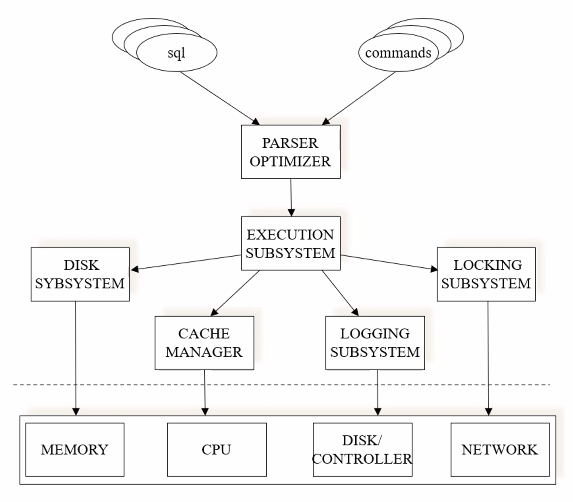
Causes of bad performance may have to do with disk size, log system, locks…
# Tuning Principles
- Think globally, fix locally
- we have to know everything about the DB to investigate what is going on
- usually the solution is a simple change
- . Partitioning breaks bottlenecks
- temporal and spatial
- many transaction may compete for the same resources
- Start-up costs are high; running costs are low
- bringing data to memory is costly (finding execution plans)
- Render unto server what is due unto server
- take the most advantage of the DB system (joins, logic operations…)
- Be prepared for trade-offs
- indexes are trade-offs (inserting data means updating indexes)
# Techniques (in this lecture)
- Schema tuning
- Query Tuning
# Schema Tuning
consists of changinf the tables of the database to get better perfiormance
# Normalization and Denormalization
A relation R is normalized if every interesting functional dependency X -> A has the property that X is a key of R
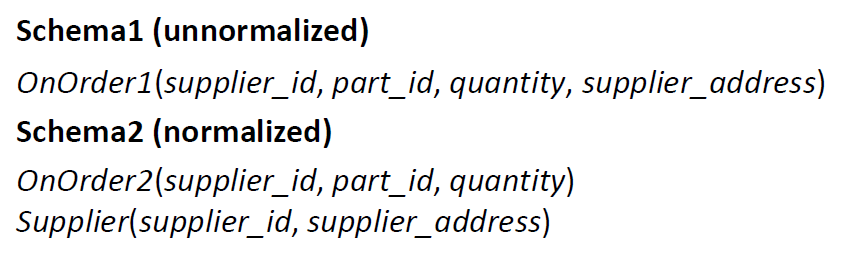
- OnOrder1 is not normalized, because the key is ( supplier_id , part_id ) but supplier_id alone determines supplier_address
- OnOrder2 and Supplier are normalized
Normalization is not always better
Space: Schema 2 saves space, we are not repeating the supplier_address
Update anomalies (information preservation): Some supplier addresses might get lost with schema 1 if a supplier is deleted once the order has been filled
Performance trade-off: In case of frequent accesses to supplier’s address given an ordered part, then schema 1 is good, specially if there are few updates
Denormalizing means sacrificing normalization for the sake of performance:
- Denormalization speeds up performance when attributes from different normalized relations are often accessed together
- Denormalization hurts performance for relations that are often updated
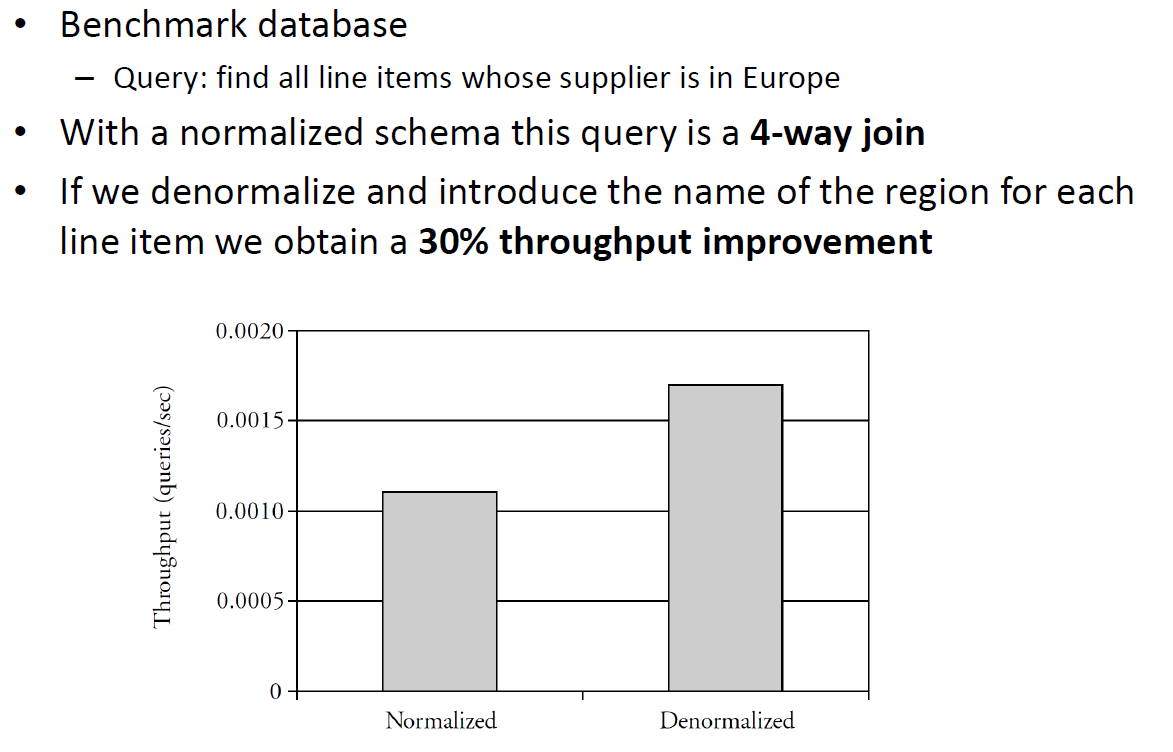
See Slides for Benchmark
# Queries
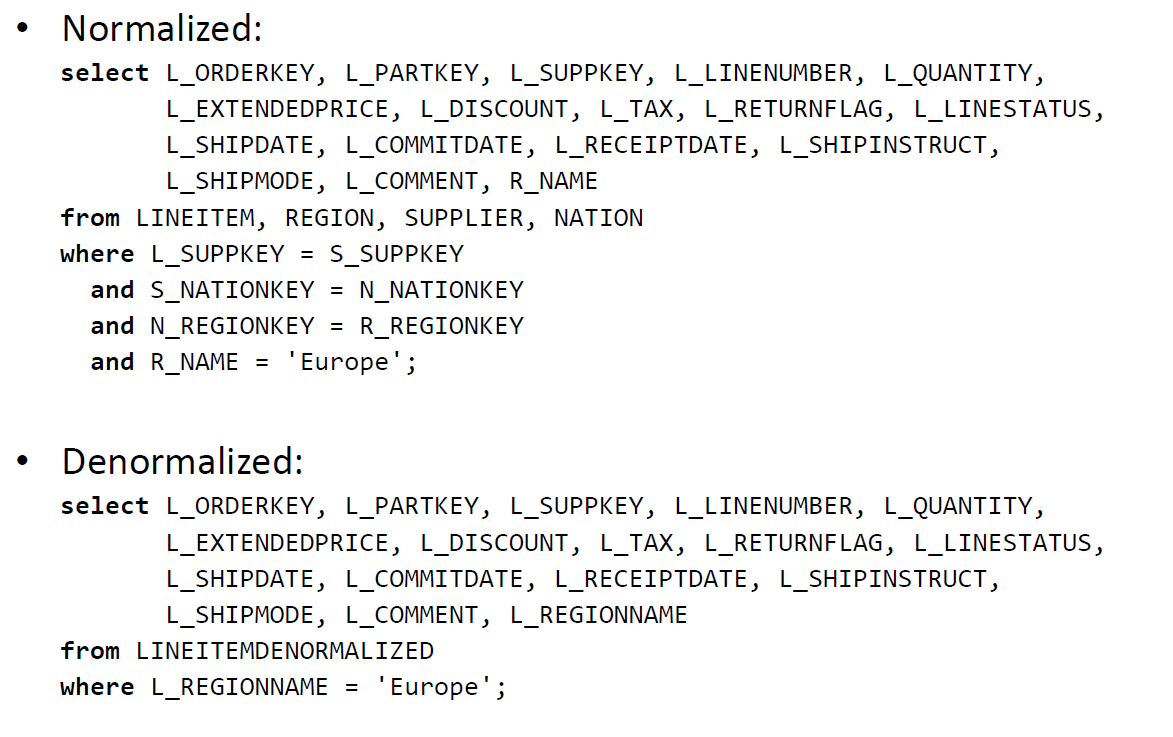
The query: “find all line items whose supplier is in Europe”
In a Normalized schema 600 000 line items, 500 suppliers, 25 nations, 5 regions In a Denormalized one 600 000 line items
# Partitioning
# Vertical Partitioning (columns)
Three attributes: account_ID , balance , address
Functional dependencies:
- account_ID->balance
- account_ID->address
Two possible normalized schema designs: ( account_ID , balance , address ) or ( account_ID , balance ) ( account_ID , address )
Q: Which design is better? R: It depends on the query pattern .
- The address is used mainly by the application that sends a monthly account statement
- The balance is updated or examined several times a day
The second schema might be better because the relation ( account_ID , balance ) can be made smaller
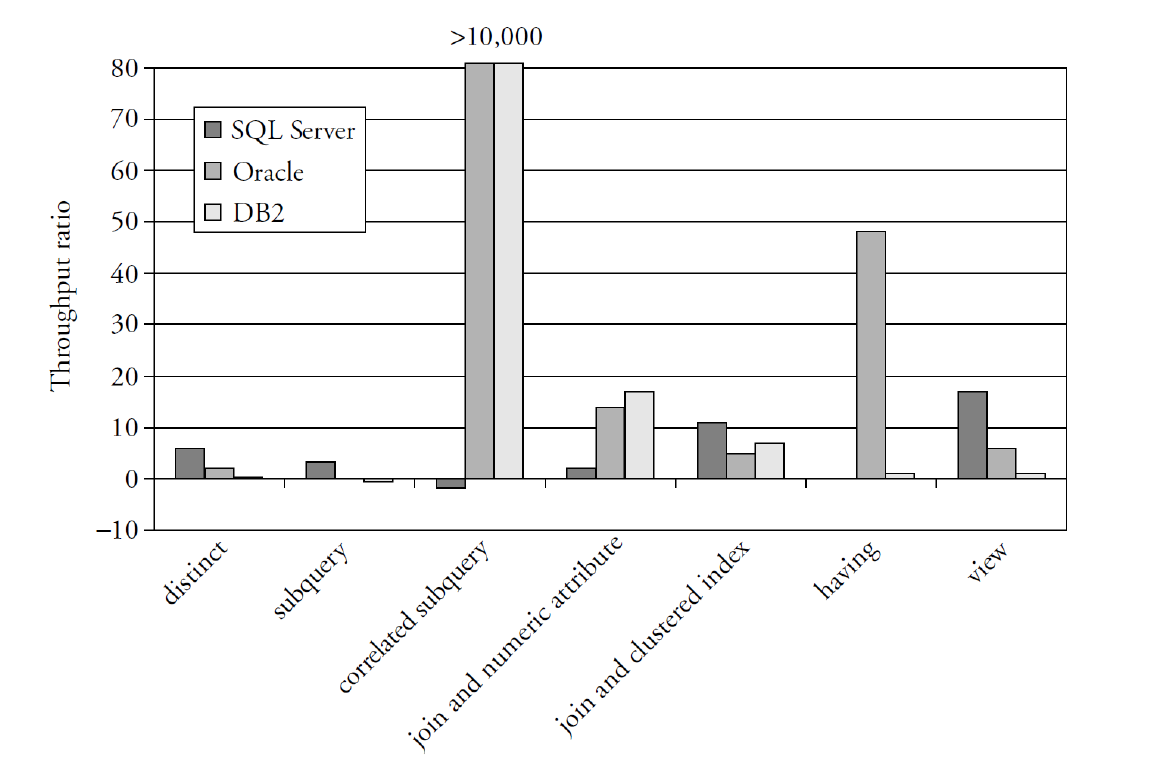
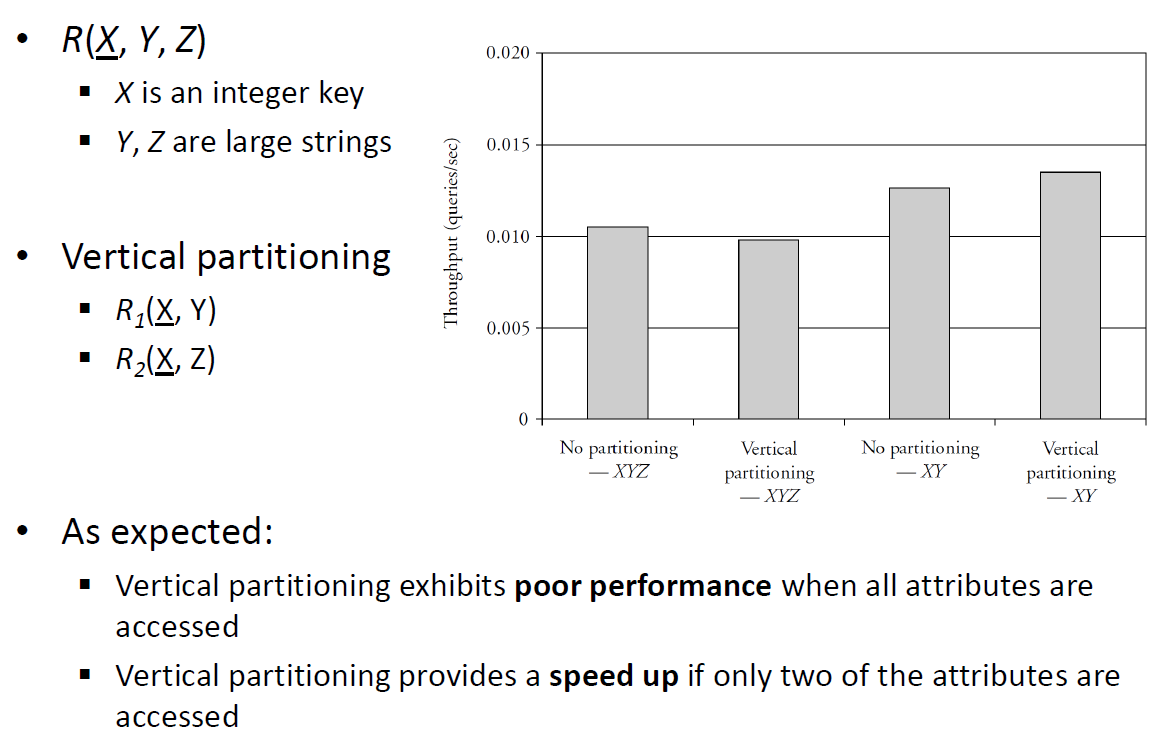
A single normalized relation XYZ is better than two normalized relations XY and XZ for queries accessing X, Y, Z together
The two relation design is better if:
- Accesses to X, Y and X, Z are separate most of the time
- Attributes Y or Z have large values
Benchmarking:
# Vertical Partitioning vs Vertical Antipartitioning
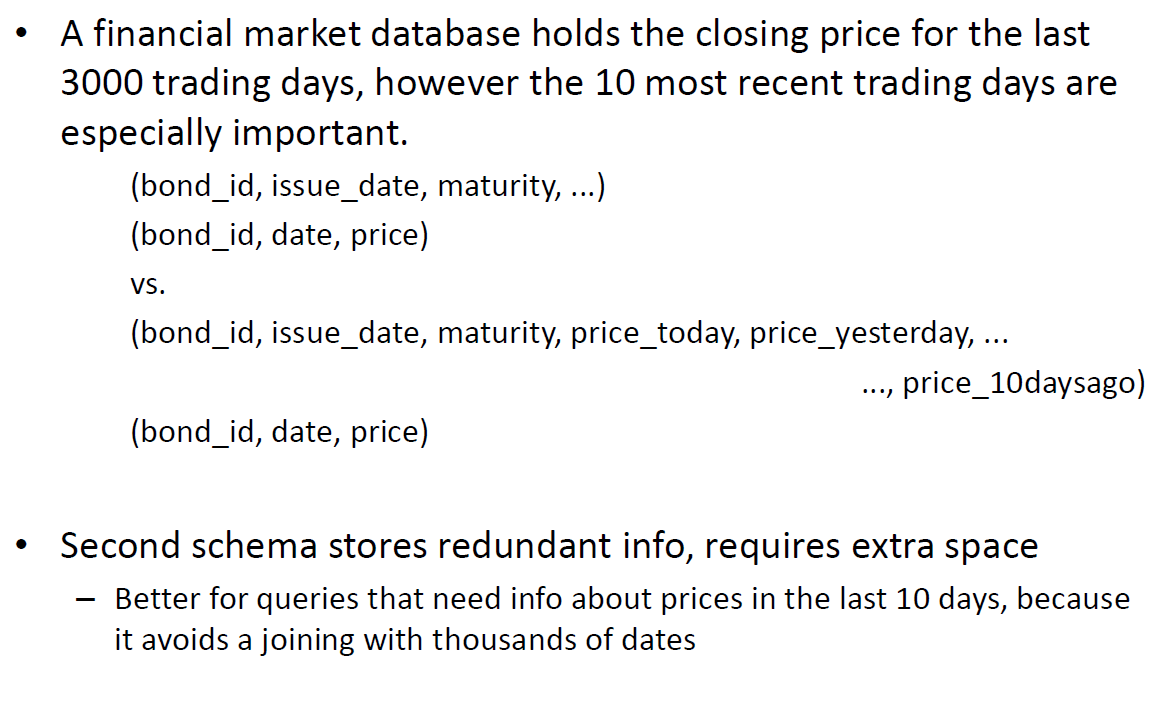
Breaking the rules in the name of performance
# Horizontal Partitioning (rows)
The accounting department of a convenience store chain issues queries every 20 minutes to obtain:
The total dollar amount on order for a particular vendor
The total dollar amount on order by a particular store
Original Schema: Orders(ordernum , itemnum , quantity, store, vendor) Item(itemnum , price) Store(store, name)
The total dollar queries are expensive vendor selection on Orders, join with Item on itemnum , multiply price * quantity, then sum similarly for store, possibly requiring join with Store if selection by name
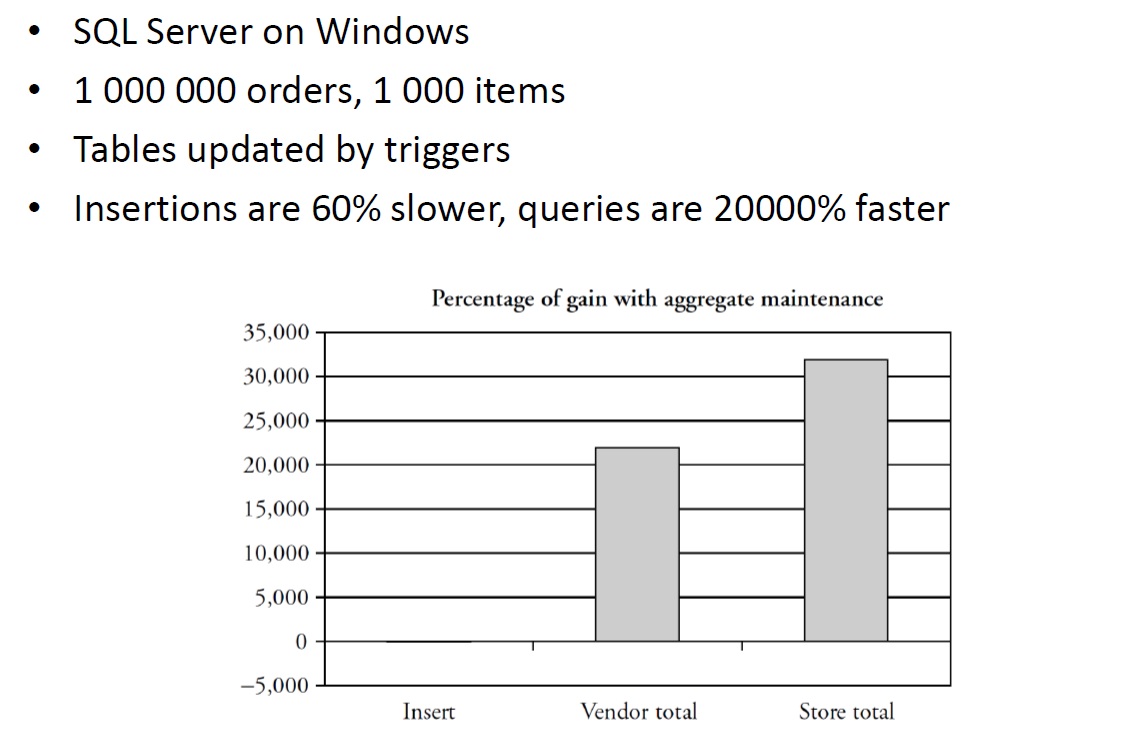
Solution: Aggregation Maintenance
Add the following materialized views:
VendorTotal (vendor, amount), where amount is the dollar value of goods on order to the vendor, with a clustered index on vendor.
StoreTotal (store, amount), where amount is the dollar value of goods on order by the store, with a clustered index on store.
Each update to Orders should update to these two views
- materialized views take care of these updates implicitly
- can also be implemented with tables updated by triggers
Benchmark:
# Query Tuning
# Index Usage
- Many query optimizers will not use indexes in the presence of:
- Arithmetic expressions WHERE salary/12 >= 4000;
- Substring / upper / lower expressions SELECT * FROM Employee WHERE SUBSTR(name, 1, 1) = ‘G’;
- Numerical comparisons of fields with different types
- Comparison with NULL
# Eliminate Unneeded DISTINCTs
Ways to eliminate DICTINCT
- sorting
- hashing
PRIMARY KEYs do not repeat
- JOINs on PK do not need DISTINCT
In general, DISTINCT is required when:
- The set of values or records returned should contain no duplicates
- The columns returned do not contain a key of the relation created by the FROM and WHERE clauses
# Reaching
- Call a table T privileged if the fields returned by the SELECT contain a key of T
- Let R be an unprivileged table. Suppose that R is joined on equality by its key field to some other table S , then we say R reaches S
- Now, define reaches to be transitive. So, if R1 reaches R2 and R2 reaches R3 then say that R1 reaches R3
There will be no duplicates among the records returned by a selection, if one of the two following conditions hold:
- Every table mentioned in the FROM clause is privileged
- Every unprivileged table reaches at least one privileged table
See Slides for examples (56~58)
# Types of Nested Queries
When you use a row from the FROM, you have a nested query See Slides for examples (59~60)
# Rewriting Subqueries
# Rewriting of Uncorrelated Subqueries
uncorrelated nested queries -> flat query
- Retain the SELECT clause from the outer block
- Combine the arguments of the two FROM clauses
- AND together all the WHERE clauses, replacing IN by =
| |
becomes
| |
# Rewriting of Correlated Subqueries
correlated nested queries -> temporary table Query: find the employees who earn more than the average salary in their tech department
| |
This could be inefficient; same average salary computed multiple times
Solution
| |
Returns the average of salaries per tech department
| |
A better solution would be to use a materialized view (automatically created when creating indexes in SQLServer)
# (Ab)use of Temporaries
Query: Find all employees in the information systems department who earn more than $40000
| |
Optimizer would miss the opportunity to use the index on dept
More efficient solution:
| |
# Join Conditions
Example: Find all students who are also employees
| |
Both tables have index on name , but it is a non clustered index;
The following join would be much more efficient:
| |
Here we can have a MERGE as both tables are sorted on the clustered index on the PK
# Use of HAVING
Do not use HAVING when WHERE is enough
| |
Here we are creating a GROUP for every dept (bad performance)
| |
only 1 group!
# Use of VIEWS
Views may cause queries to execute inefficiently
| |
| |
The query below will be slower because of the expansion of the view (also price of JOIN) The system might not use the view
# Performance Impact of Query Rewritings