Lecture 8 - Database Recovery
# Database Crash and Recovery System
# Failure Classification
# Transaction failure
- Logical errors
- “not enough money to transfer”
- transaction cannot complete due to some internal error condition
- System errors
- the database system must terminate an active transaction due to an error condition ( e.g. deadlock)
# System crash
A power failure or other hardware or software failure causes the system to crash.
- Non volatile storage is assumed not to be corrupted by system crash
- Database systems have numerous integrity checks to prevent corruption of disk data
# Disk failure
A head crash or similar disk failure destroys all or part of disk storage
- Destruction is assumed to be detectable: disk drives use checksums to detect failures
# Stable Storage
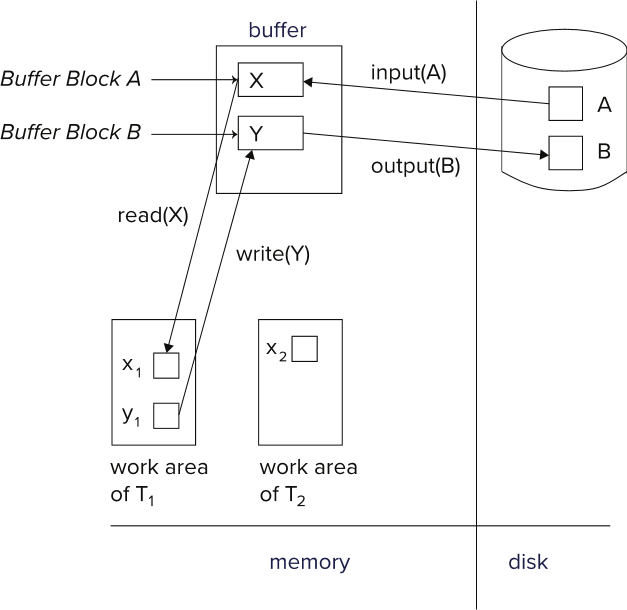
See: Volatile and Non-Volatile Storage
An ideal form of storage that survives all failures
- Approximated by maintaining multiple copies on non volatile media
- RAID is not enough; copies should be at different remote sites to protect against disasters such as fire or flooding Ideally Logs should be stored here in order to replicate in case of some failure
Log example:
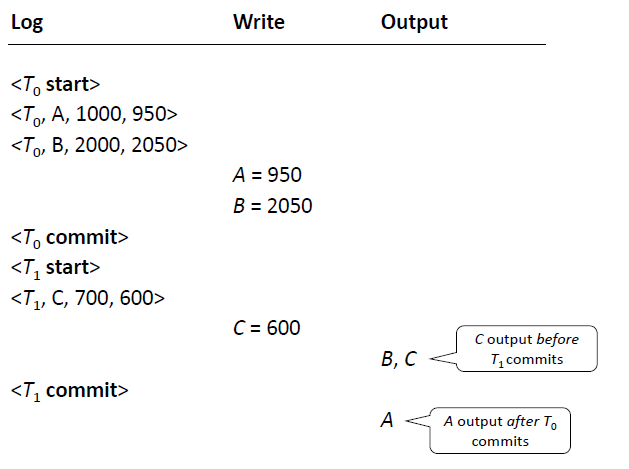
- We ask the OS to write the object and take note in the log of the change in the object
- In case of sys failure and are not sure if the change in disk we can check the log in case we need to replicate the change
- The OS doesnt execute the operation right away
- It outputs objects in diff order of the transactions
# CRASH
If crash after commits - no problem in reapplying the changes
# REDO
- Crash between T0 commit and T1 start
- If T0 commits, we re-write the new A and B values
- after sometime the values will end up on disk
# UNDO
- Crash before T0 commit
- If T0 doesnt commit, the transaction is incomplete, the state is incomplete and have to go back to consistent
- We go back to the “old” values, 1000 and 2000, because we dont know the values at crash
- CLR: Each time we UNDO, we have to take log of the event. its a CLR (Compensation Log Record)
See Slides for examples (18)
# Checkpoints
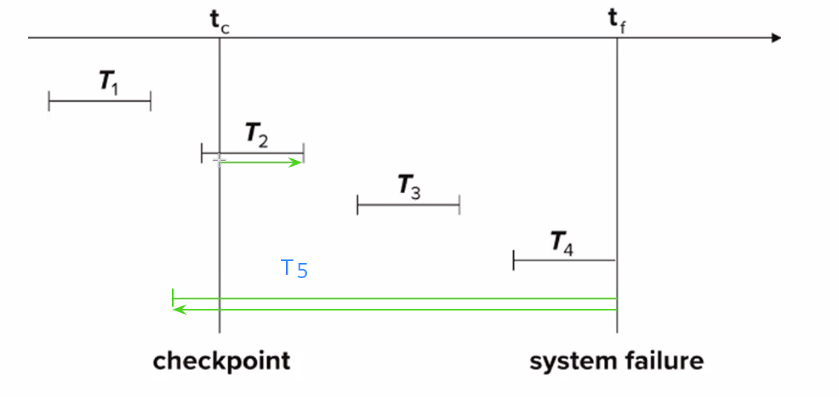
Recovery after system failure:
- Ignore T1 (updates already output to disk due to checkpoint)
- Redo T2 and T3
- Undo T4 During recovery we need to consider only the most recent transaction Ti that started before the checkpoint, and transactions that started after Ti
Example not in image:
- T5 starts before checkpoint and is incomplete as failure
- MUST BE UNDO until checkpoint AND BEFORE
- When REDO we only have to redo from checkpoint
# Recovery Algorithm
- Logging
- Start log
- Update log
- Commit log
- Transaction Rollback (normal, no crash)
- Scan from end
- perform UNDO
- write CLR
- write Abort log
- Recovery from failure: Two phases
- REDO phase: replay updates of all transactions, whether they committed, aborted, or are incomplete
- UNDO phase: undo all incomplete transactions
REDO phase
- Find last < checkpoint L > record, and set undo list to L
- Scan forward from above < checkpoint L > record
- Whenever a record < Ti Xj , V1 , V2> or <Ti , Xj , V2> is found, REDO it by writing V2 to Xj
- Whenever a log record < Ti > start is found, add < Ti > to undo list
- Whenever a log record < Ti commit > or < Ti abort > is found, remove Ti from undo list
UNDO phase:
- Scan log backwards from end
- Whenever a log record < Ti Xj V1 , V2 > is found where Ti is in UNDO list perform the following rollback actions:
- perform UNDO by writing V1 to Xj
- write a CLR
- Whenever a log record Ti start is found where Ti is in UNDO list,
- Write a log record < Ti abort >
- Remove Ti from UNDO list
- Stop when UNDO list is empty
- i.e. < Ti start > has been found for every transaction in UNDO list
After undo phase completes, normal transaction processing can commence
# ARIES
Algorithm for Recovery and Isolation Exploiting
In ARIES,
- Blocks are called pages
- Every log record has a log sequence number (LSN)
- Every page in the database contains the LSN of the most recent log record that changed that page
- This is called the pageLSN
- Updating a page creates a new log record and sets the pageLSN of that page to the LSN of that log record.
- Each log record contains a pointer to the previous log record of the same transaction
- This is called the prevLSN
- The first log record of a transaction has prevLSN = NULL
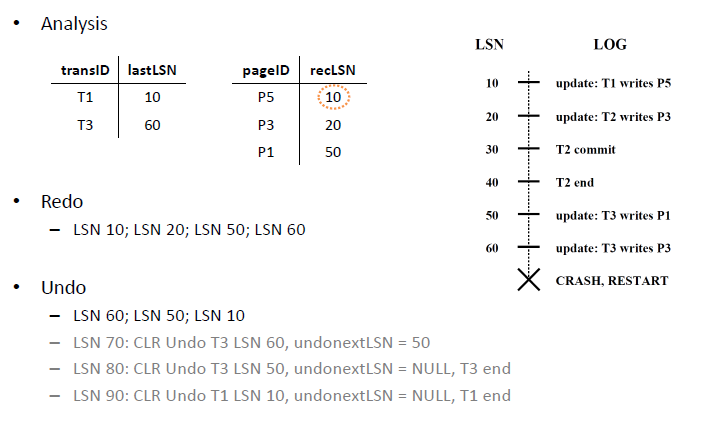
Besides the log, ARIES RECONSTRUCTS the two additional data structures
Dirty page table
- Contains one entry for each dirty page in the buffer, i.e. a page with changes that are not yet reflected on disk.
- Each entry contains a recLSN , which is the LSN of the first log record that caused the page to become dirty.
Transaction table
- Contains one entry for each active transaction
- Each entry contains a lastLSN , which is the LSN of the most recent log record for the transaction.
# Recovery in ARIES
SQL Server uses.
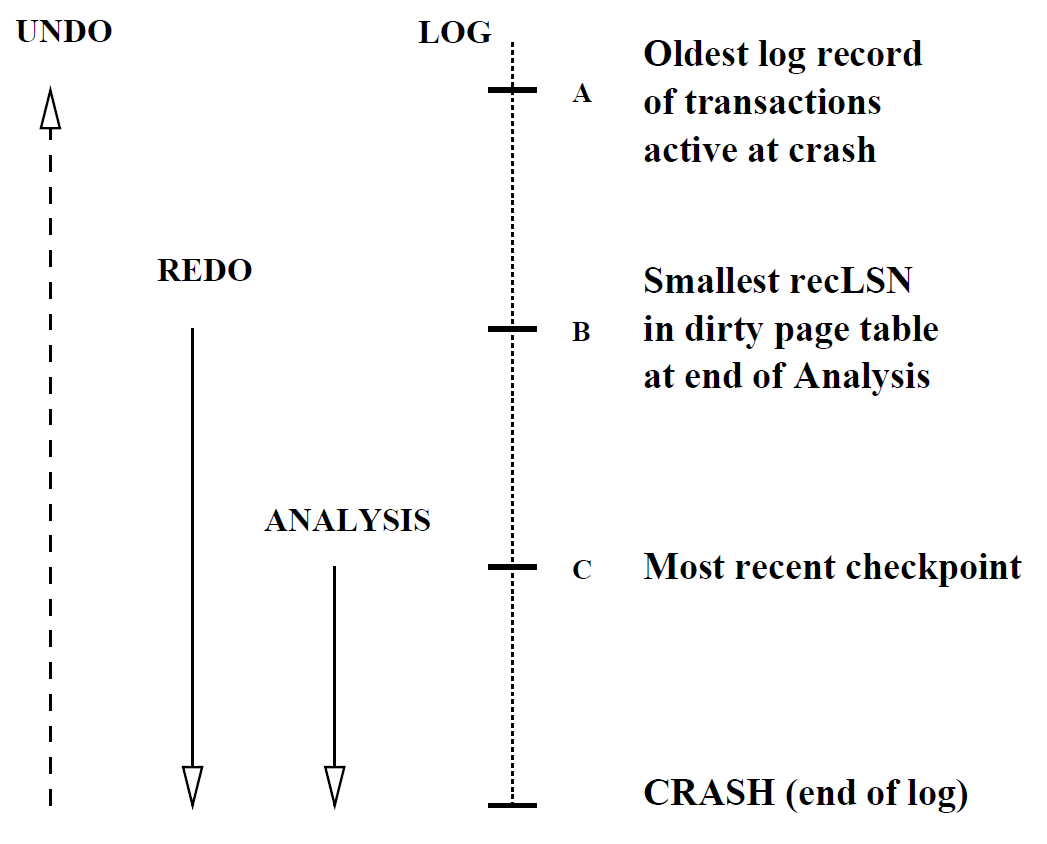
- Analysis - Reconstruct dirty page table and active transaction table
- Redo - Repeats all actions, starting from an appropriate checkpoint in the log (first entry in DIRTY PAGES TABLE), and restores the database state to what it was at the time of the crash (re-writes).
- Undo - Undoes the actions of transactions that did not commit (TRANSACTION TABLE), so that the database reflects only the actions of committed transactions.
- CLRs are to be redone, never to be undone
See Slides for examples (38~44) Note:
ARIES uses a log-based approach to recover from failures. It maintains a write-ahead log (WAL) that records all updates made by transactions before they are written to the database.
- There is a special < Ti end > event that marks the end of a transaction (when it has been committed or completely rolled
- The < Ti abort > event does not indicate when a transaction has been completely undone (this is indicated by < Ti end >)
- < Ti abort > indicates when a transaction error occurred
The distinction between end and commit is unclear (couldn’t get a clear answer from Chat-GPT)
Lecture 7 Transactions and concurrency pt2 | Lecture 9 Tuning