Lecture 2 - Storage and file organization
# Storage and file organization
# Physical Storage Systems vs Logical Storage Systems
Files and bytes vs in-memory Tables
# Classification of Physical Storage Media
- Volatile storage: Loses contents when power is switched off (ex: RAM)
- Non-volatile storage: Contents persist even when power is switched off. • Includes secondary and tertiary storage, as well as batter-backed up main-memory (ex: Disk)
What happens when we lose an hard drive? Need to bring the data to volatile storage in order to perform queries
Fastest memory: Cache in CPU, but scarce and smallest
- Primary: Cache, Main Memory (Volatile)
- Secondary: Flash Memory, Magnetic Disk (Non-Volatile. “on-line storage”)
- Tertiary: Optical Storage, Magnetic Tape (“off-line storage” and used for archival)
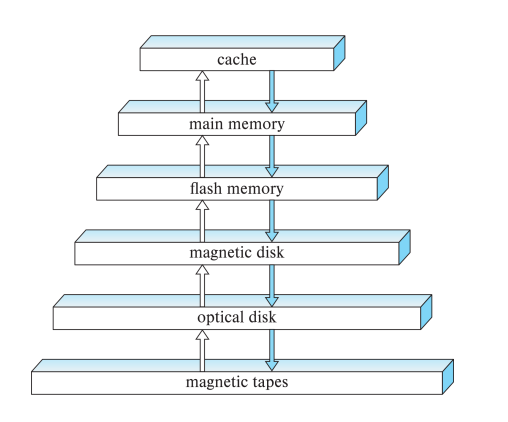
Performance vs Storage
Main storages talked about in the course: RAM and Magnetic Disk
# Storage Interface
SATA
SAS
NVMe (Fastest Non-volatile)
Disks usually connected directly to computer system
In Storage Area Networks (SAN), a large number of disks are connected by a high-speed network to a number of servers
In Network Attached Storage (NAS) networked storage provides a file system interface using networked file system protocol, instead of providing a disk system interface
# Magnetic Hard Disk Mechanism (outdated)
Let’s see why hardware can have such an impact on performance Hard drives are REALLY SLOW (7200rpm), even when level and multiple needles. With 6 needles, we still dont even have 1 order of magnitude of improvement
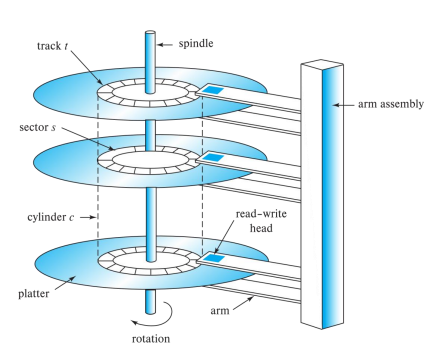
If you are reading the inner track or the outter track, you are subjected to seek time (needle moving takes milliseconds)
# Speed of rotation bottlenecks READ/WRITE speed
Databases data should be stored sequencially along the tracks (tables), so when you need to read a table, you dont need to jump the needle to different places (reduce seek time) The physical table should be stored imitating the logical data stucture of a table
# block = page
Usually when fetching data, it’s read in blocks SQL refers to blocks as pages (informal “chunks”) You cant read/write 1 byte, you read/write block (usually 4 or 8 KB)
Blocks are often refered to hardware and are 4KB SQL uses 8KB pages as pages are associated to memory
You retrieve a block to a page in memory
# Performance Measure
Mean time to failure (MTTF) The average time the disk is expected to run continuously without any failure. - Typically 3 to 5 years - Probability of failure of new disks is quite low, corresponding to a “theoretical MTTF” of 500,000 to 1,200,000 hours for a new disk • E.g., an MTTF of 1,200,000 hours for a new disk means that given 1000 relatively new disks, on an average one will fail every 1200 hours - MTTF decreases as disk ages
HDD usually fails because of mechanical error in a sense of, you can no longer write data to it.
More Disks -> More chance of failure Each Disk lasts 1M hours -> 1000 Disks -> first fail on average in 1000 hours
# RAID - Redundant Arrays of Independent Disks
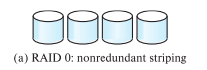
- RAID Level 0: Block striping; non-redundant.
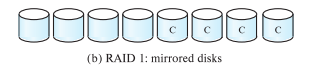
- RAID Level 1: Mirrored disks with block striping Not the best, 2x space and 2x write
- RAID Level 5: Block-Interleaved Distributed Parity 1 XOR 1 = 0 | 1 XOR 0 = 1 if you lose your data 1 XOR ? = 0 | ? XOR 0 = 1 you can guess that ? was 1
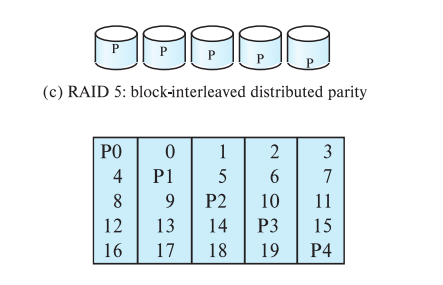
5 blocks per Disk, P0 (Parity Block) is used as storage for the XOR operation with the other blocks, using PO to retrieve the data lost. Parity Blocks use round-robin, so if you lose a disk, you can reconstruct the data and recompute the Parity Block (1 P per Disk )
# Optimization of Disk-Block Access
- Buffering: in-memory buffer to cache disk blocks
- Read-ahead: Read extra blocks from a track in anticipation that they will be requested soon
- Disk-arm-scheduling algorithms re-order block requests so that disk arm movement is minimized
- Elevator algorithm
- Disk Controller can remmap physical accesses to make them sequential
# File Organization
The database is stored as a collection of files. Each file is a sequence of records. A record is a sequence of fields.
We assume that records are smaller than a disk block.
# Fixed-Length Records
Same table records stored in blocks If magnetic disk, should store the blocks sequencially, to read the table faster
# Storing
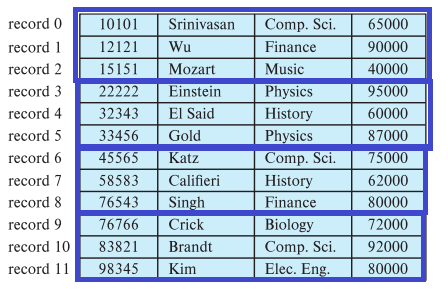
Store record i starting from byte n * (i – 1), where n is the size of each record. Record access is simple but records may cross blocks Modification: do not allow records to cross block boundaries
# Deleting
Deletion of record i:
- move records i + 1, . . ., n to i, . . . , n – 1
- move record n to i
- do not move records, but link all free records on a free list
Record 3 deleted -> Record 2 and 4 are now together BAD APROACH, because you need to reorganized a lot of records, while pulling back the list
Better Deletion
- move records i + 1, . . ., n to i, . . . , n – 1
- move record n to i
- do not move records, but link all free records on a free list Record 3 deleted and replaced by record 11 -> 2, 11, 4, …
Another Alternative
- move records i + 1, . . ., n to i, . . . , n – 1
- move record n to i
- do not move records, but link all free records on a free list -> 2, null, 4, …
# Variable-Length Records
Usually there is a header with this information in the blocks Variable-length records arise in database systems in several ways:
- Storage of multiple record types in a file.
- Record types that allow variable lengths for one or more fields such as strings (varchar)
- Record types that allow repeating fields (used in some older data models). Attributes are stored in order Variable length attributes represented by fixed size (offset, length), with actual data stored after all fixed length attributes Null values represented by null-value bitmap
# Storing Large Objects
- blob/clob types
- Records must be smaller than pages
- Alternatives:
- Store as files in file systems
- Store as files managed by database
- Break into pieces and store in multiple tuples in separate relation
# Multitable Clustering File Organization
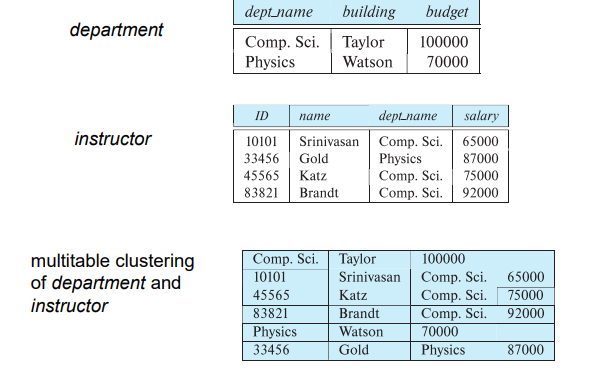
On disk, multiple logical tables are stored in the same physical table In the course were going to utilize the oposite, one logical table to multiple physical tables (Table Partitioning)
# Table Partitioning
Conceptually, we have one table, but in physical terms we have multiple tables (good for performance)
# Horizontal Partitioning
Imagina a table of “orders” we might want to separate orders of 2018, 2019… Most likely you will be working with orders related to the year.
- Partitioning
- Reduces costs of some operations such as free space management
- Allows different partitions to be stored on different storage devices
- E.g., transaction partition for current year on SSD, for older years on magnetic disk
# Vertical Partitioning
# Data Dictionary (System Catalog)
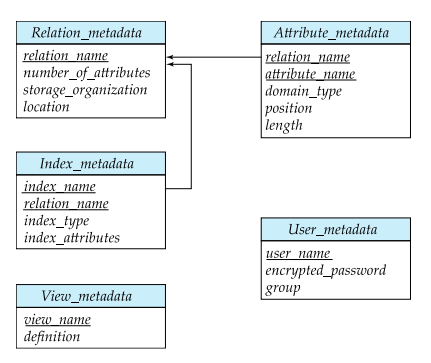
- Stores metadata
- Information about relations
- User and accounting information, including passwords
- Statistical and descriptive data
- Physical file organization information
- Information about indices
# Storage Access
If you want to read from disk, you need to bring to memory and read it from there.
Buffer: portion of main memory available to store copies of disk blocks. Buffer manager: subsystem responsible for allocating buffer space in main memory.
# Column-Oriented Storage
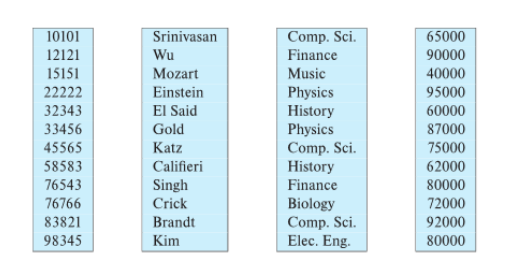
Benefits:
- Reduced IO if only some attributes are accessed
- Improved CPU cache performance
- Improved compression
- Vector processing on modern CPU architectures Drawbacks:
- Cost of tuple reconstruction from columnar representation
- Cost of tuple deletion and update
- Cost of decompression
Columnar representation found to be more efficient for decision support than row-oriented representation (same data type)
Traditional row-oriented representation preferable for transaction processing
When you can fit in-memory, it becomes better to store in column to perform operations (Vector processing, Parallel, special CPU ops…)
In this course we are dealing with data that does not fit in-memory…