Lab 02 - Storage and file structure
.mdf files* Data files contain data and objects such as tables, indexes, stored procedures, and views. large file (in the AdventureWorks2019 DB Properties, this file has an unlimited MAXSIZE)
.ldf Log files contain the information that is required to recover all transactions in the database. smaller sized file (in the AdventureWorks2019 DB Properties, this file has an ~2GB MAXSIZE)
# Creating an ExampleDB
| |
- The primary (master) data file has extension .mdf
- Other (secondary) data files have extension .ndf
- The log file has extension .ldf
3 Different File Groups
Log file initial value: 5MB Log file max value: 100MB
Primary Data file on initial size: 30MB Data file on FILEGROUP SECONDARY_1 initial size: 20MB Data file on FILEGROUP SECONDARY_2 initial size: 30MB Data files have unlimited max value
All files grow 15% everytime more storage in needed, except for the data file in the SECONDARY_1 file group, which grows 2MB
# Creating an ExampleTable
| |
- 2 numeric columns VALUE1 and VALUE2, 1 string column STR1
- The table is partitioned
- tuples where VALUE1 < 10 are physically stored in a filegroup
- tuples where VALUE1 >= 10 are physically stored in another filegroup
Note: Remember that, when creating a database table, if a schema is not specified, the default schema is dbo
# Populating ExampleTable
| |
# Info from System Views
| |
- The system view sys.partitions returns a row for each partition of all tables in the database. (In this case, we want the partitions of ExampleTable only.)
- The system view sys.destination_data_spaces returns a row for each data space destination of a partition scheme.
- The system view sys.filegroups returns a row for each data space that is a filegroup.
Results:
| name | rows |
|---|---|
| SECONDARY_1 | 4 |
| SECONDARY_2 | 5 |
# Investigating contents of a data file in SQL Server
- Unit of storage: Page (8KB)
- 128 Pages / Megabyte
- Each page begins with a 96B header
- Page number
- Page type
- Amount of Free Space
- ID from the object that owns the page
- Data rows are put on the page serially, starting immediately after the header.
- A row offset table starts at the end of the page
- each row offset contains one entry for each row on the page
- each row offset entry records how far the first byte of the row is from the start of the page.

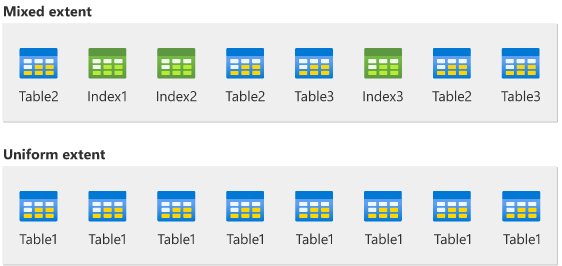
When SQL Server needs to manage space (allocate new pages, or deallocate existing ones), it does so in groups of 8. A group of 8 pages is called an extent. An extent is 8 physically contiguous pages, or 64 KB. This means SQL Server databases have 16 extents per megabyte.
SQL Server has two types of extents: uniform and mixed. Uniform extents are owned by a single object; all eight pages in the extent can only be used by the owning object. Mixed extents are shared by up to 8 objects; each of the eight pages in the extent can be owned by a different object.
Note: Log files (.ldf) do not contain pages; they contain a series of log records.
# Page Allocations
Using system function:
| |
Results:
| partition_id | allocated_page_page_id |
|---|---|
| 1 | 8 |
| 2 | 8 |
- The system function sys.dm_db_database_page_allocations provides information about the pages that belong to a particular database object (in this case, ExampleTable).
- The type of pages that we are interest in is data pages (more on this later).
Note*: In our case there are two partitions, and the page ID might happen to be the same in each of those partitions.
Using system views:
| |
- The system view sys.partitions returns a row for each partition of all the tables and indexes in the database (in this case, we want the partitions of ExampleTable only).
- The system view sys.destination_data_spaces returns a row for each data space destination of each partition scheme.
- The system view sys.database_files indicates the data file that corresponds to each data space.
Results:
| partition_number | file_id | physical_name |
|---|---|---|
| 1 | 3 | C:\Temp\ExampleDB_File2.ndf |
| 2 | 4 | C:\Temp\ExampleDB_File3.ndf |
Note: In our case, each partition is in a different file, and the file ID identifies each of those physical files.
# DBCC - Database Console Commands
| |
DBCC (database console commands) are special SQL Server commands used for database administration, maintenance and troubleshooting.
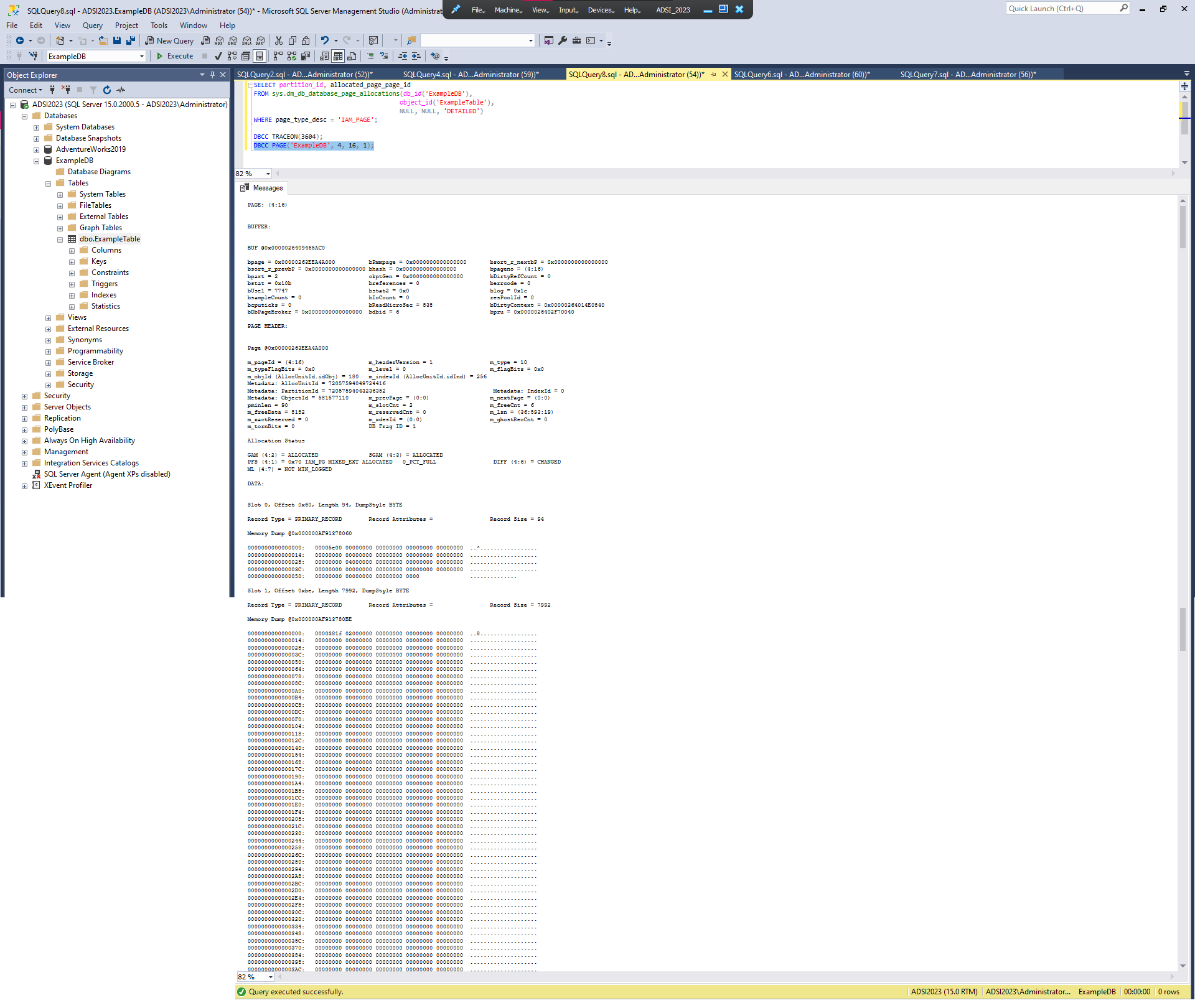
DBCC TRACEON(3604);configures a trace flag to redirect the output of DBCC commands to the results window.DBCC PAGE('ExampleDB', 3, 8, 1);allows us to inspect the actual contents of a given data page.- The first parameter is the database
- The second is the file ID
- The third is the page ID
- The last is a print option that can be changed from 0 to 3 to provide more detailed information.
- In this case, our file ID is 3 and our page ID is 8. You should replace these values with the file ID and the page ID that you have obtained earlier for partition 1.
- Each Slot corresponds to a row
(…) Slot 0, (…) 0000000000000000: 30000c00 08000000 28000000 03000001 00140043 0…….(……….C
Slot 1, (…) 0000000000000000: 30000c00 08000000 14000000 03000001 00140041 0………………A
Slot 2, (…) 0000000000000000: 30000c00 09000000 1e000000 03000001 00140042 0… …………..B
Slot 3, (…) 0000000000000000: 30000c00 09000000 28000000 03000001 00140043 0… …(……….C
If we change the command to show info on file ID 4, the 5 records end with B, C, A, C, A.
# SET STATISTICS IO ON;
| |
Going to the Messages Tab
- The scan count is 2 because there are two partitions to retrieve data from (which requires two seek/scan operations).
- The number of logical reads is 2 because there are two data pages to retrieve (one data page in each partition; it could be larger if there were more data pages in each partition).
- The number of physical reads is 0 because the data pages did not have to be read from disk (they were already in memory)
- Enabling Include Actual Execution Plan (Ctrl+M)
- Re-executing only the
SELECTquery - Switching to the Execution Plan Tab
While hovering the Table Scan, we can see some stats, including:
- Number of rows
- Partition Count
- Object the systrem is operating on
# IAM Page
| |
Results:
| partition_id | allocated_page_page_id |
|---|---|
| 1 | 16 |
| 2 | 16 |
As the table grows pages are allocated in groups of 8 (extents).
As the file grows, SQL Server needs to know which extents contain pages of a given object. For this purpose, SQL Server uses a special type of page, called IAM page (Index Allocation Map).
Internally, an IAM page contains a bitmap where each bit refers to an extent in the file, and the bit value (1 or 0) indicates whether the extent has been allocated to the object or not
Note: An IAM page can cover about 4 GB of data, so the table would have to grow considerably before another IAM page needs to be created.
Using DBCC:
| |
- First record: IAM header
- sequence number (for IAM pages)
- the starting extent of the range of extents mapped by this IAM page
- and single page allocations in mixed extents, if any. etc
- Second record: Bitmap
- shows extents allocated to the object in the same aprtition as the IAM See more